Archiving vs Deleting
In Scryla, items are archived before they can be permanently deleted. This includes chapters, scenes, notes, and other project elements.
This two-step process helps protect your work from accidental deletion.
Because writing projects often evolve over time, ideas that seem unnecessary today may become useful again later. Archiving allows you to safely remove items from your active workspace without losing them permanently.
Archiving an Item
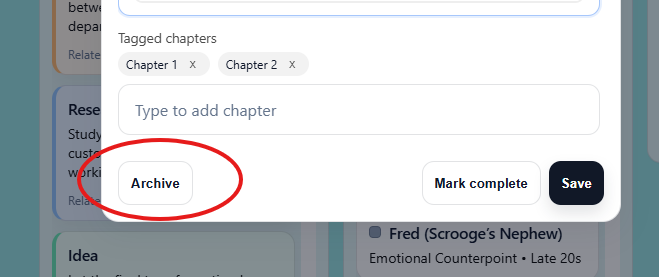
When you archive an item:
-
It is removed from the active board or view
-
It is stored safely in the Archive drawer
-
It can be restored at any time
This makes archiving ideal for:
-
Alternate scenes
-
Removed plot ideas
-
Draft notes you may want later
Permanently Deleting an Item
If you are sure you no longer need something, you can permanently delete it from the Archive.
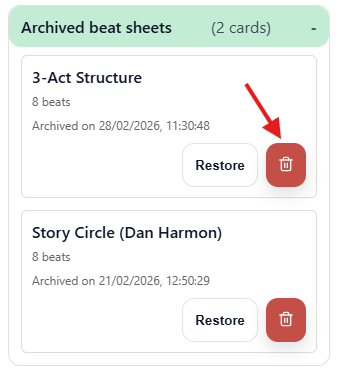
To do this:
-
Archive the item.
-
Open the Archive drawer from the Project menu.
-
Locate the archived item.
-
Select Delete permanently and then confirm your choice.
Once permanently deleted, the item cannot be recovered.
Why Scryla Uses Archiving First
Many writing tools allow immediate deletion, which can lead to accidental loss of work.
Scryla deliberately uses an archive-first approach to make it easy to:
-
Experiment with ideas safely
-
Remove clutter from your board
-
Restore earlier versions of your work if needed
This allows writers to stay organized without risking the loss of important material.
Many writers use the Archive as a temporary “idea graveyard” where unused scenes and notes can be kept in case they become useful later.